Articles
Extending Expo Prebuild to support Amazon Vega
BY Mohamed Omar
•Mon, Dec 29, 2025
Expo's prebuild system can be extended to support out-of-tree platforms like Amazon Vega without forking or modifying Expo itself. After initially exploring a custom plugin architecture, there is a simpler approach via byCedric's custom-prebuild-example. By providing a custom template containing a vega/ platform folder, developers can use the standard npx expo prebuild --platform vega command to generate Fire TV project files from a shared codebase. This enables a single App.js to run across iOS, Android, and Fire TV while respecting each platform's native requirements.
Key challenges include aligning React and React Native versions between Expo and Vega, configuring Metro bundler to enable code sharing while isolating dependencies, and running parallel development environments for simultaneous iOS and Vega testing.
How Expo Prebuild Supports Custom Platforms
Expo's prebuild command implements Continuous Native Generation (CNG) — generating native platform folders from app.json configuration rather than maintaining them manually. While Expo officially supports iOS and Android, the underlying system is more flexible than documented.
When you run npx expo prebuild --platform vega, Expo doesn't reject the unknown platform. Instead, it looks for a corresponding folder in the provided template. If found, it copies the folder and applies name transformations (replacing HelloWorld with your app's name, com.example.helloworld with your bundle identifier).
This means any platform can be supported by:
Creating a template with a platform folder (e.g., vega/)
Packing it as a tarball (npm pack)
Passing it via -template
npx expo prebuild --platform vega --template ./template/expo-vega-template-1.0.0.tgzThe template structure is straightforward:
template/
├── package.json      # Base dependencies
├── gitignore         # Merged into project
└── vega/             # Platform folder
    ├── manifest.toml
    ├── index.js
    ├── package.json
    ├── metro.config.js
    └── babel.config.js
Version Alignment: Matching Expo and Vega
The primary technical constraint is React Native version compatibility. Vega requires React Native 0.72.0 and React 18.2.0. Most current Expo SDKs use newer versions, which causes runtime errors when sharing code between platforms.
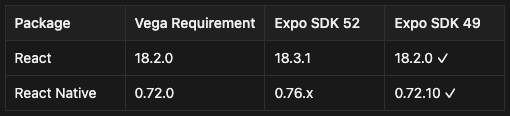
Expo SDK 49 is the last version with React Native 0.72.x compatibility. This is a hard requirement — mixing React versions causes cryptic rendering errors:
Objects are not valid as a React child (found: object with keys {$$typeof, type, key, props})The version lock means forgoing newer Expo features, but enables true code sharing.
Metro Configuration: Sharing Code, Isolating Dependencies
The goal is a single App.js imported by both Expo and Vega entry points. The challenge: each platform has its own node_modules with different React Native versions. Metro must watch the parent folder for code changes while resolving dependencies only from the platform's local node_modules.
// vega/metro.config.js
const config = {
  watchFolders: [
    path.resolve(__dirname, '..'), // Watch parent for App.js
],
  resolver: {
    nodeModulesPaths: [
      path.resolve(__dirname, 'node_modules'), // Only vega's modules
],
    blockList: [
      // Block parent's node_modules entirely
      new RegExp(parentRoot + '/node_modules/.*'),
],
    extraNodeModules: {
      'react': path.resolve(__dirname, 'node_modules/react'),
      'react-native': path.resolve(__dirname, 'node_modules/react-native'),
},
},
};
The blockList is critical. Without it, Metro resolves some deep dependencies from the parent's node_modules, causing version mismatches.
For platform-specific code in App.js, use Platform.isTV:
let StatusBar = null;
if (!Platform.isTV) {
  StatusBar = require('expo-status-bar').StatusBar;
}
Parallel Development: Running Two Metros
Developing for iOS and Vega simultaneously requires two Metro bundler instances. Each must run on a different port to avoid conflicts.
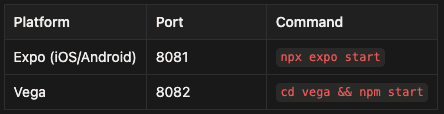
The Vega template configures port 8082 by default:
{
  "scripts": {
    "start": "react-native start --port 8082"
  }
}
A typical three-terminal workflow:
Terminal 1: npx expo start                 # iOS Metro
Terminal 2: cd vega && npm start           # Vega Metro
Terminal 3: cd vega && npm run build:debug # Vega builds
For Vega Virtual Device (VVD) testing, port forwarding connects the device to Metro:
kepler device start-port-forwardingHMR and Fast Refresh
Hot Module Replacement works differently across platforms:
iOS (Expo): Full HMR support. Edit App.js, see changes instantly.
Vega: HMR is limited. Two options:
- Vega Studio (VS Code extension): Supports Fast Refresh when running from the
vega/folder - CLI rebuilds: No HMR. Each change requires
npm run build:debug
The Vega CLI's --skip-bundling flag doesn't enable live reloading as one might expect — it simply omits the JS bundle, which won't run without a pre-bundled package.
For rapid Vega iteration, Vega Studio is recommended. For CI/CD and production builds, the CLI workflow suffices.
The Final Workflow
Setup:
npm install
npm run prebuild:vega        # Generates vega/ from template
cd vega && npm install
Development:
# iOS
npx expo start
# Vega
cd vega
npm run build:debug
kepler run-kepler build/aarch64-debug/*_aarch64.vpkg -d VirtualDeviceThe project structure follows CNG principles — native folders are generated, not committed:
expo-vega-unified/
├── App.js      # Shared component
├── app.json    # Source of truth
├── template/   # Committed
│ └── vega/     # Platform template
├── ios/        # Generated (gitignored)
├── android/    # Generated (gitignored)
└── vega/       # Generated (gitignored)
Limitations and Future Considerations
Current limitations:
- Locked to Expo SDK 49 until Vega supports newer React Native versions
- No native Expo config plugins for Vega (manifest.toml modifications require template changes)
- HMR requires Vega Studio; CLI workflow requires rebuilds
- Expo-specific packages (expo-camera, expo-location, etc.) won't work on Vega without platform implementations
Future possibilities:
- Vega updating to React Native 0.76+ would unlock modern Expo SDKs
- Expo could add first-party platform extensibility, eliminating the template workaround
- Community config plugins for manifest.toml modifications
The template approach is pragmatic - it works today without waiting for upstream changes from Expo or Amazon.
Check out Econify's sample repository here.